

| Feature |
iQ-VIEW 2.7.0 (3D) |
iQ-VIEW PRO 2.7.0 (3D) |
| System Requirements |
| Supported operating systems |
Windows XP Home / Professional SP3 / Mediacenter / Tablet (32bit) Windows VISTA Home Premium / Professional / Business / Ultimate Windows 7 Professional SP1 / Enterprise / Ultimate (32/64 bit) |
| High-resolution display support |
Support of iQ-GRAFIX, all nVidia, ATI and Matrox graphics adapters |
| IMAGE DISPLAYS |
Supported |
| General |
| Graphical user interface |
Scalable buttons and possibility to change font size for main windows |
| Support of Unicode languages in GUI |
Supported |
| Viewer |
| Image processing |
Windowing (dynamic and static), color remapping, measurements, zoom/pan, scroll zoom, magnifier, flip/rotate, synchronization/ desynchronization of series, virtual bind mode, tiling, etc. |
Windowing (dynamic and static), color remapping, measurements, zoom/pan, scroll zoom, magnifier and special magnifier window, flip/rotate, synchronization/ desynchronization of series, virtual bind mode, tiling, etc. |
| Screen tiling |
Both on series and image level |
| Scoutline functions |
Configurable Lines mode to display plane projection and/or plane intersections, additionally scoutpilot and 3D position display |
| Scope function |
Applying of windowing, zoom/pan changes to current image or whole series |
| Image sorting functions |
According to instance number, instance time and slice position (both ascending and descending) |
| Image filters |
Integrated filters in viewer (sharpen, edge enhance, high and low pass, etc.) |
| Color schemes / remapping |
General color schemes |
General color schemes and nuclear medicine color schemes |
| Tool configuration |
Configurable bottom toolbar (change of default toolbar) |
Configurable bottom toolbar (change of default toolbar) Configuration of modality-specific toolbar (using HP) |
| Support of presentation states (PR) |
All changes in images are cached in form of presentation states on image level for easier image processing and export |
All changes in images are cached in form of presentation states on image level for easier image processing and export Presentation state objects can be stored, sent/retrieved and exported |
| Measurement functions |
Supported measurements: distance, angle, Cobb angle, ROI, round ROI, ratio, modify, delete Measurements can be printed and stored as secondary capture; images can be exported as BMP, JPEG, TIFF, RAW including measurements |
Supported measurements: distance, angle, Cobb angle, ROI, round ROI, polygonal ROI, perpendicular distance, ratio,modify, delete, copy of measurements to other images to enable 3D measurements, e.g. TTTG Measurements can be printed and stored as secondary capture or as presentation state; images can be exported as BMP, JPEG, TIFF, RAW including measurements |
| Annotation of images |
Supported Annotations can be printed and stored as secondary capture; images can be exported as BMP, JPEG, TIFF, RAW including annotations |
Supported Annotations can be printed and stored as secondary capture or as presentation state; images can be exported as BMP, JPEG, TIFF, RAW including annotations |
| Storing of measurements and annotations |
Creation of secondary capture images to permanently store annotations and measurements / transfer back to PACS |
Creation of secondary capture images or storing as presentation states to permanently store annotations and measurements / transfer back to PACS |
| Multi-monitor support |
Dual monitor/display supported; third monitor possible for study browser, RIS application and iQ-3D |
| Stack mode / Cine mode |
Both supported Additional cine navigation |
| Comparison of multiple studies |
Supported |
| Automatic loading and automatic tiling of loaded studies |
Support of both automatic loading and tiling |
| Hanging Protocols |
Not supported |
Supported Including the creation of HP sequences and modality-specific toolbars |
| Creation of shortcuts for viewer actions |
Supported |
| Overlays |
User customizable viewer overlay settings, e.g. name, comments, study data, etc. Opportunity to change size of text overlay in viewer |
| Customized text overlay |
Available text overlay script for customization (OverlayMapping.script |
| Bitmap Overlay / DICOM embedded shutter |
Supported |
| Look-up tables |
Supported |
| AVI export |
Supported Possibility to use compression codices |
| Reporting |
| Structured reporting module |
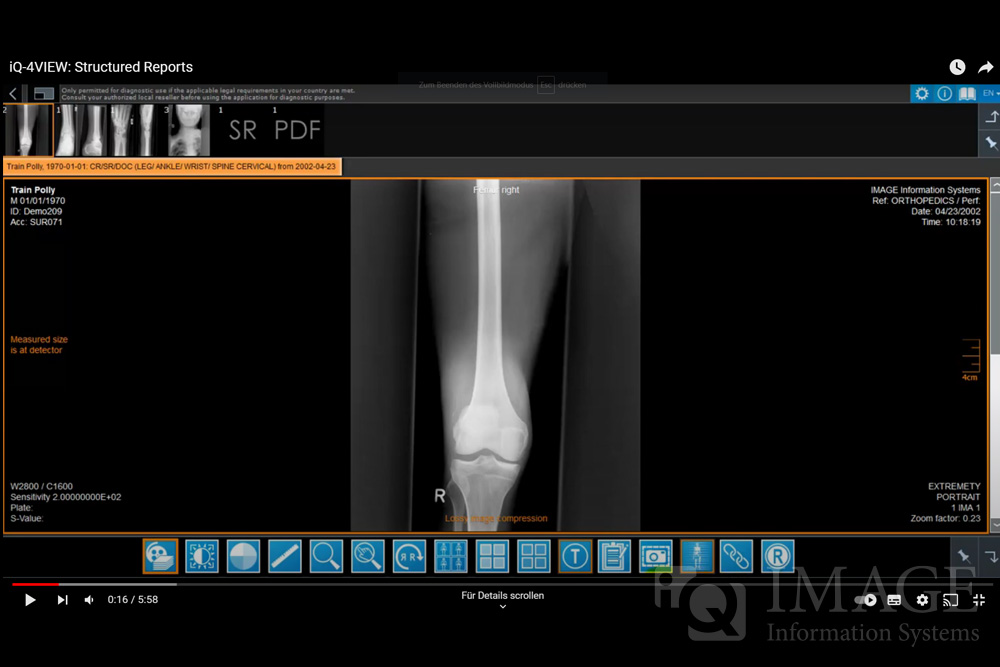
Creation of basic structured reports to add as SR object to a study, to print out, to send to remote archive or to export to other applications (copy to clipboard function) Display and editing of own structured reports Configuration of macros and text modules for standardized reports Display of structured reports of other manufacturers |
| Report dictation |
Interface to third-party software NCH Express Dictate |
| Post-processing modules |
| 3D post-processing (3D/MPR/MIP/SSD/VRT) |
Multiplanar Reconstructions / Surface Rendering / Maximum Intensity Projections / Volume Rendering in optional iQ-3D add-on module Auto-selection of hardware-optimized renderer Single (PC-based) or concurrent (floating user) licenses |
| Image stitching |
Optional image stitching module (iQ-STITCH) |
| Nuclear medicine analysis |
Interface to optional iQ-NUC modules |
| Orthopedic templating |
Interface to optional OrthoViewTM module |
| Communication |
| DICOM Query/Retrieve |
Supported Possibility to set type of remote archives (Server, Workstation or Gateway) |
| DICOM Print SCU |
Support of DICOM grayscale print True-size (1:1) DICOM print |
| DICOM Worklist Client |
No DICOM Worklist Client |
Full DICOM Modality Worklist Client |
| DICOM Email |
Supported Including export of DICOM and JPEG images |
| Support of JPEG and JPEG 2000 compression (DICOM email) |
Supported Configurable ZIP compression |
| HIS/RIS Interface |
Interface to RIS applications, e.g. BDT/GDT, Accession number |
| Sending of user-created DICOM objects |
Sending of user-created DICOM objects (SR, secondary capture images) directly from viewer |
Sending of user-created DICOM objects (SR, secondary capture images and presentation states) directly from viewer |
| Import |
| TWAIN interface (scanner, video capture, CR) |
Full TWAIN module incl. individual settings |
| CR reader interface |
Not recommended |
iQ-CR ACE interface, incl. histogram function and S-Value (optional)
|
| DirectShow® video capture interface |
No DirectShow® interface |
DirectShow® capture interface iQ-CAPTURE |
| Foot switch support |
Not supported |
Supported(iQ-CAPTURE / PRO hardware package) |
| Drop box interface |
Available |
| Image file import |
Import of JPEG, BMP, TIFF and RAW images from CD/DVD, memory stick, directories |
| Patient CD import |
Support of DICOM image import from CD/DVD, memory stick, file directories |
| Adding of patient / study data to imported images |
Manual entries RIS request with patient / study data directly to "Import" dialog via GDT/BDT |
Manual entries Via DICOM Modality Worklist client RIS request with patient / study data directly to "Import" dialog via GDT/BDT |
| Export |
| Patient CDs |
Creation of patient CDs; support for SR (structured report) display |
| Patient DVDs |
Creation of patient DVDs; support for SR (structured report) display |
Creation of patient DVDs; support for SR (structured report) and PR (presentation state) display |
| Memory sticks |
Creation of projects on memory sticks or in directories; support for SR (structured report) display |
Creation of projects on memory sticks or in directories; support for SR (structured report) and PR (presentation state) display |
| Connection to robot devices |
Direct interface to iQ-ROBOT for patient CD/DVD creation |
| Lite viewer for CDs/DVDs |
iQ-LITE viewer can be burned on patient CD/DVD; additionally HTML pages with JPEG images can be burned to view studies in a web browser (for Apple, Linux, Unix Users) |
| Windows Print |
Supported for all Windows printers (PostScript is recommended for better quality) |
| Overlays and page header |
Opportunity to change size of text overlay for print; possibility to add background to text overlay (for better readability); possible addition of institution name to page header |
| Image export to file |
Export as BMP, JPEG, TIFF, RAW Including measurements, windowing, color remapping,annotations, etc. |
| Study Browser |
| Study table |
Yes |
| Thumbnail preview |
Yes |
| Virtual patient root model |
Yes |
| Search filters |
Yes |
| Languages |
| Multi-language support |
Bulgarian, Czech, Dutch, English, Estonian, Finnish, French, German, Italian, Japanese, Korean, Latvian, Persian, Polish, Portuguese (PT, BR), Russian, Spanish, Turkish iQ-VIEW 3D: Dutch, English, French, German, Japanese, Russian, Spanish |
| Service & Support |
| Technical support |
Extensive user documentation (User manuals, Administration Guide) Professional technical support, user forum, MANTIS bug & feature tracking system |
| Licensing |
| Activation of software licenses |
Activation key based on hardware fingerprint Single(PC-based) or concurrent (floating user) licenses |
| Certification |
| Certification as a medical device |
CE and FDA 510(k) certification For full professional use as a medical device |